And now a message from one of our infrastructure teams:
Hi Everyone,
We are pleased to share that the Photoshop’s backend infrastructure for UXP plugins has been updated and is now available in the Photoshop Beta build: 27.8 20260510.m.3537
This update ensures a more consistent look and feel for Photoshop UXP plugins across Creative Cloud applications and lays the foundation for future UI enhancements and shared capabilities.
What this means for UXP plugin developers?
For the UXP plugins not using Spectrum components, this update would bring your plugin’s UI to a lot closer to a Spectrum based UXP plugin.
For the UXP plugins using Spectrum components, this change is largely not expected to impact UI look and feel, except for changes in text font size and placement of text with in the text area.
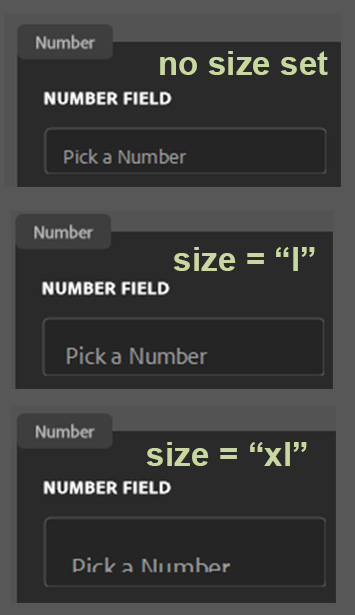
Before this change Ps was ignoring the font size of the text field (sp-textfield) passed down from the plugin and always used a fixed size to render the text. With this change, Ps will handle the font size passed from plugins and use that. If the font size inside text fields look different in latest Ps Beta, please try updating the font size in your UXP plugin code.
Our bundled UXP plugins provided a good testbed for the change, but we acknowledge that it is not exhaustive. Please test your UXP plugins in the latest Photoshop Beta and share feedback here if you notice any visual changes or functional issues. Your input is important and will help us ensure a smooth transition as we progress toward a full release. Please share your feedback, questions or any issues you encounter by replying to this thread.
I have virtual scrolling with 269 text fields and when I switch to Drover performance are a bit worse and rendering is more lagging. Like the input wrapper scrools with HTML but the interactive UI part of the same UI lags behind on Windows.
And since you are updating scrollbar. Can I please please have scrollbar in textarea on Windows?
@samgannaway
Can you tell us how to get the sp-textfield values to be cenetered vertically with these new changes instead of looking bad and uncentered?
Can you tell us how to deal with the fact that sp-textfiled type=“number” values are now forced to round to the nearest whole number and every plugin that relies on that to be able to have a decimal is now not working correctly?
If only several users had pointed out in the prerelease forums that Drover was causing these problems and that drover was not yet ready to be pushed into the public beta…oh wait.
@samgannaway it would be really appreciated if you or someone at Adobe could offer some help on this. Is there somewhere else I should be posting? The pre-release forum also does not seem to be getting me any helpful replies.
I am getting a bit desperate now that Drover is in the public beta and these issues are now more prevalent. It seems like Adobe is moving forward with Drover despite the issues for developers, so we could use some help on how to mitigate the issues for Adobe users.
@bany0 --I see on some of your sliders that the handle’s bottom pixel is missing. The handle isn’t uniformly round. It’s a bit flat on the bottom. I’m seeing that too on my. In fact, on my plugins, the entire slider seems to have been lowered one-pixel relative to what they were before Drover implementation. Perhaps this is why the bottom pixel is now truncated.