Yes, it looks like the text displaying in the number fields is much better, and the rounding is fixed to where it does not show extra decimal zeros and only rounds to 2 decimals.
The issue with the plugin windows not getting focus if a document is open (you cannot use mouse wheel to scroll a plugin gui) has not been fixed.
We tried reproducing this issue locally on Windows and Mac but could not reproduce it at our end. Would it be possible to share sample plugin/code? Thanks.
I am just testing with the kitchen sink but it is the same for any uxp plugin that needs to scroll. When I open the kitchen sink plugin, I can use the mouse wheel to scroll the plugin. But if I open a document, then I can no longer scroll the plugin using the mouse wheel. Even if I click into the plugin gui. This only happens in the drover version I believe and I have only tested it on pc.
This post is additional information regarding two problems with the new UXP UI backend. The problem with the border was included with the list by @Erin_Finnegan higher in this thread. The problem with the sp-slider was not included in the list. I have found these issues to be Windows-only. I cannot repro them on Mac. These problems persist in the latest public version of Ps Beta: Adobe Photoshop Version: 27.10.0 20260715.m.3606 e4201fa x64
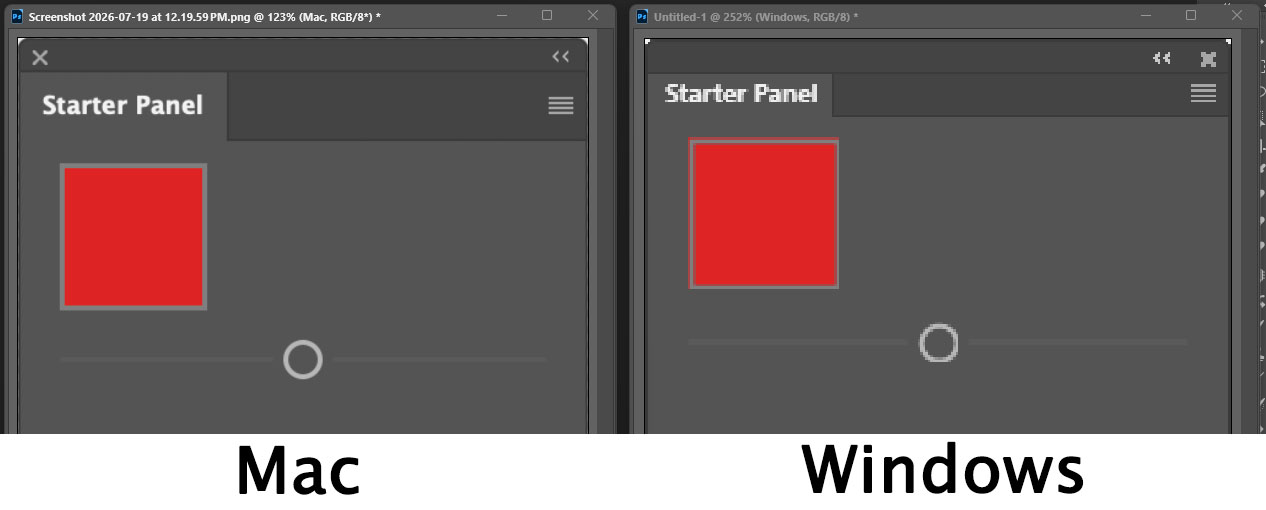
For testing, I used the plugin created by the attached .ccx file. It has a red square with a with a 2-px gray border and an sp-slider element.
The border around the red square is just awful. Instead of a 2-px gray border, it is a 1-px gray border and it is offset 1-px from the left and 1-px from the top. This results in the red square bleeding out on the left side and the top. I also causes a shadow between the red square and the border on the bottom and the right. The Mac panel displays a clean 2-px gray border around a red square with no bleeding and no shadow.
The handle for the slider is NOT completely round. It is missing some pixels on the bottom and the right causing these edges to appear flat instead of round. The Mac panel displays a perfectly round slider.
These Windows problems are more apparent on a low-resolution monitor. The Windows monitor’s resolution for this screenshot is 1680 x 1050. The Mac monitor’s resolution is 2560 x 1664. In the image, the two panels have been zoomed so that the square and the slider are the same size. On Windows with higher resolution monitors (1080p and 4K), the problems are not as obvious, but they’re definitely still there.
On my Windows computer, I’ve also noticed other situations where the plugin calculates element placement—that used to line up perfectly before the new backend—but now appear offset 1-px from both the top and the left, just like the border in this example. So, this misplacement/misalignment of elements is likely more universal than what is shown in this example.
It would be really nice to get this fixed before the new backend is included in the general release version of Ps.
I took the liberty of tagging you in a post in the prerelease section. I am never entirely sure whether it is possible to discuss the issues I encounter in the Beta here due to the NDA.
In any case, you should find the tag in a post published under the name Carlo Diamanti. When you have a chance, I would kindly ask you to read it and, if possible, take a look at the other reports I have submitted as well.