Is it possible, aside from sampling pixels with the Imaging API, to get the bounding box for each individual line in a Text Layer in Photoshop for paragraph text layers?
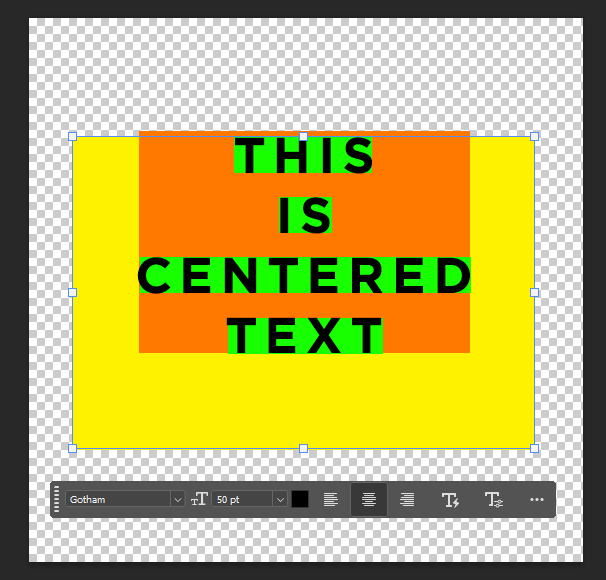
boundingBox shows the entire usable bounding box. ( yellow )
bounds shows the actual used bounding box ( orange )
Yea, that had crossed my mind. I’d probably prefer to go with the Imaging API than generate and delete a bunch of text layers, but thanks for mentioning that!
If it ends up being faster than the Imaging API for large layers, I might reconsider this route.
There is no better way. You can’t read it directly in action manager code. But I would love to have that option.
What I did in my script to split text layers… remove all text decorations like underlines, strike through etc. then convert text into vector. Now in subpaths you should be able to have one subpath per letter.
Then you can find at what index starts paragraph and match index with subpath. So you could get first point of e.g. letter “C”.
Then you can replicate the text layer but remove all other paragraphs. Convert to vector again. Get frist point of letter “C” and now you have x,y coordinates for translation to match original position.
Now you can make pixel selection from vector (if you don’t need underline etc.) and apply translation and have correct bounds.
Not sure if Imaging API is easier, better or faster.
In UXP you can suspend history and resume with not commiting the changes to document. Maybe it could reduce UI flashing.
Also PS team has 1st party API to suspend UI updates as well. They use it new actions panel canvas previews I think.
Awesome, appreciate the response! Creating a vector from the text might actually be a lightweight solve, I’ll need to test it out compared to the imaging API.
Also will have to check out createTemporaryDocument() didn’t realize that existed, seems like a useful one!
Revisiting this thread as it would also be very helpful to get bounds around textGroups. For now, changing the group text color, sampling the pixels, and reverting the color changes is working, but having bound coordinates in the textGroups would be faster and more ideal.