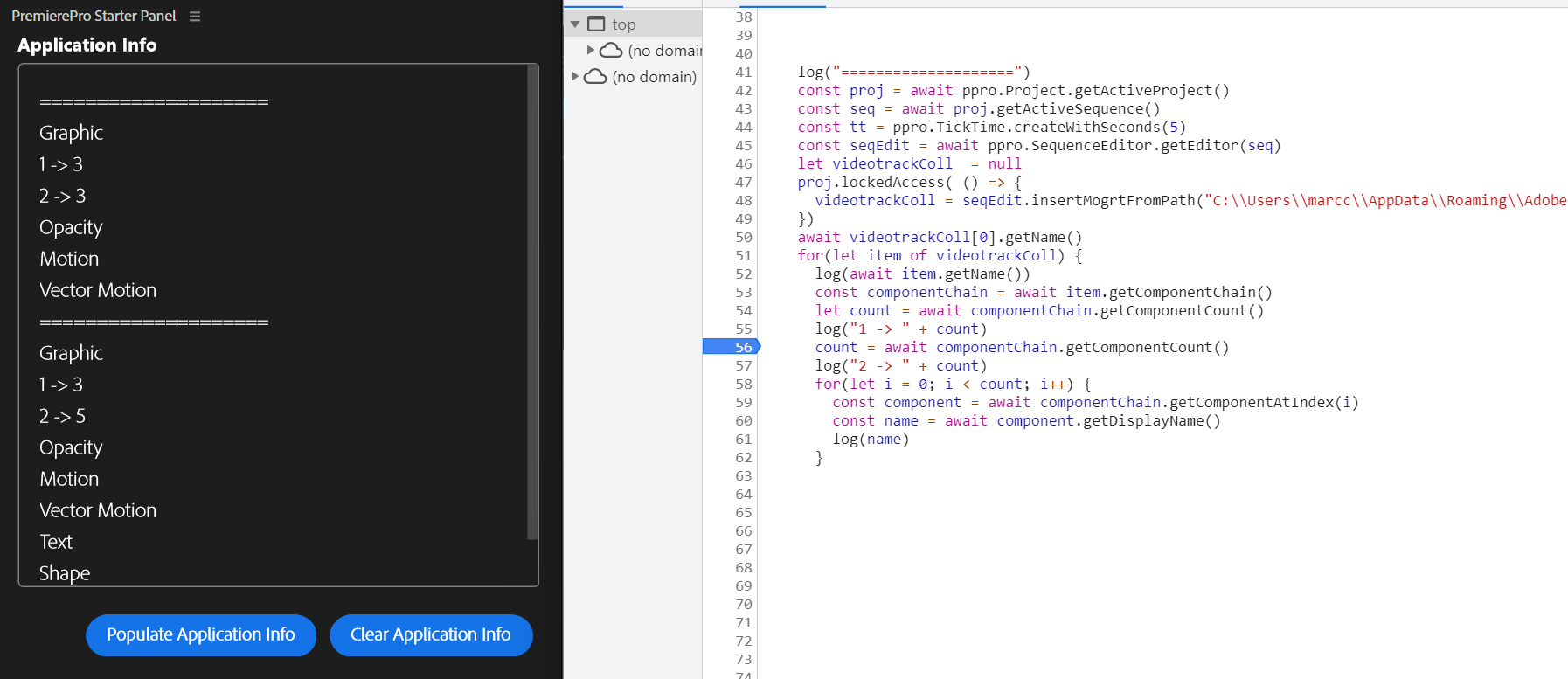
I’m looking at what a MOGRT exposes ( in the sample below after adding it to the timeline) and am I seeing very odd behavior.
At first I though I was missing an await somewhere, causing the seemingly race condition but I don’t see what I messed up (if you do please point out where ).
Here is what I use to troubleshoot (minimal code for clarity)
const ppro = require("premierepro");
// [... snip ...]
log("====================")
const proj = await ppro.Project.getActiveProject()
const seq = await proj.getActiveSequence()
const tt = ppro.TickTime.createWithSeconds(5)
const seqEdit = await ppro.SequenceEditor.getEditor(seq)
let videotrackColl  = null
proj.lockedAccess( () => {
  videotrackColl = seqEdit.insertMogrtFromPath("C:\\Users\\marcc\\AppData\\Roaming\\Adobe\\UXP\\PluginsStorage\\PPROBETA\\26\\Developer\\Test-pdmzcd\\PluginData\\Mogrt_Sample_1.mogrt", tt, 2, 2)
})
await videotrackColl[0].getName()
for(let item of videotrackColl) {
  log(await item.getName())
  const componentChain = await item.getComponentChain()
  let count = await componentChain.getComponentCount()
  log("1 -> " + count)
  count = await componentChain.getComponentCount()
  log("2 -> " + count)
  for(let i = 0; i < count; i++) {
    const component = await componentChain.getComponentAtIndex(i)
    const name = await component.getDisplayName()
    log(name)
  }
}
As one would expect, the result is the same for “1 → xyz“ and “ 2→ xyz“ log entries:
However if I put a breakpoint in between the 2 logs (then execute right away once the breakpoint is hit), the result is different.
Note that the second one is correct, this mogrt should report 5 components, “text” and “Shape” never show up before)
What did I mess up here ?
Or is it a bug (previously known or not) ?
Thx !
Back to playing with mogrt…
But what the heck is going on here ?
If I “sleep” (introduce async delay) in between calls, it will eventually get all the components object out of the componentChain…
@bbb_999 : Can you confirm this is a bug ? (or a mistake on my part)
In the meantime (as a hack) I can poll until the property I want is finally accessible, but I may need to create hundreds of objects like this, so not really scalable.
Repro steps:
- Create a rectangle object from within Premiere
- Save it as “greenRect.mogrt“ (somewhere accessible)
- Run code below (first modify the path to match where the file was saved)
// Helper function
function sleep(ms) {
    return new Promise(resolve => setTimeout(resolve, ms));
}

const ppro = require("premierepro");
// [... snip ...]
log("====================")
const proj = await ppro.Project.getActiveProject()
const seq = await proj.getActiveSequence()
const tt = ppro.TickTime.createWithSeconds(5)
const seqEdit = await ppro.SequenceEditor.getEditor(seq)
let videotrackColl  = null
proj.lockedAccess( () => {
  videotrackColl = seqEdit.insertMogrtFromPath("C:\\Users\\marcc\\AppData\\Roaming\\Adobe\\UXP\\PluginsStorage\\PPROBETA\\26\\Developer\\Test-pdmzcd\\PluginData\\greenRect.mogrt", tt, 2, 2)
})
await videotrackColl[0].getName()
for(let item of videotrackColl) {
  log(await item.getName())
  const componentChain = await item.getComponentChain()
  let count = 0
  count = await componentChain.getComponentCount()  // does not returns the expected values "Shape" missing
  log(`Component Count : ${count}`)
  count = await componentChain.getComponentCount()  // does not returns the expected values "Shape" missing - still
  log(`Component Count : ${count}`)
  while (count <= 3) {
    await sleep(500)
    count = await componentChain.getComponentCount()  // EVENTUALLY DOES return the expected value !?!?!?!? (when seem to be tied to how long to sleep for)
    log(`Component Count : ${count}`)
  }
  log("2 -> " + count)
  for(let i = 0; i < count; i++) {
    const component = await componentChain.getComponentAtIndex(i)
    const name = await component.getDisplayName()
    log(name)
    const paramCount = await component.getParamCount()
    for(let i =0 ; i < paramCount; i++) {
      const param = await component.getParam(i)
      const paramName = param.displayName
      log(`---${paramName}`)
    }
  }
}
Based on your description, it sounds like a bug.
PPro needs to load a headless version of After Effects to parse the .mogrt, so I imagine that influences the behavior.