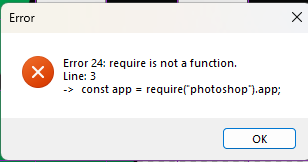
I’m ok at scripting and just started learning UXP. I’m trying to create a script to toggle a selected layer’s visibility along with any linked layers. It was working until I restarted my computer trying to get my UI to work in UXP. Now, when I run my script I get this error.
Thanks for the reply and thanks for catching the camel case. I fixed it to no avail. I commented out everything except the const’s on top and added an alert(doc.name); to the bottom just to trouble shoot, and I’m getting the same message. When I run the script through the Photoshop menu, .js and .jsx give this alert, the .psjs just fails silently. All of this code was working before the restart when running the script from PS menu.
In UXP, I can access everything to the layers, but I can’t change the visible, even before the restart, which is part of the reason I restarted in the first place.
edited to add: This started yesterday with PS 2025 and VS 2022. In trying to resolve this I have completely uninstalled and abandoned all settings and reinstalled PS 2026 and VS 2026.
this is what I have in UXP
 const app = require("photoshop").app;
 const doc = app.activeDocument;
 const allLayers = doc.layers;
 const allLayerNames = allLayers.map(layer => layer.name);
 const sortedNames = allLayerNames.sort((a, b) => a < b ? -1 : a > b ? 1 : 0);


const { entrypoints } = require("uxp");

  showAlert = () => {
    alert("This is an alert message");
  }

  entrypoints.setup({
    commands: {
      showAlert,
    },
    panels: {
      vanilla: {
        show(node ) {
        }
      }
    }
  });
//FUNTIONS
function fillText(i){    document.getElementById("layers").innerHTML = `
      <ul>${
   i
      }</ul>`;}

function showLayerNames() {
   fillText(sortedNames.map(name => `<li>${name}</li>`).join("")   )
}
function mapsON() {
    doc.activeLayers[0].visible = true;
    doc.activeLayers[0].linkedLayers.forEach(i => i.visible = true);
   }


//visibility doesn't change
function mapsOFF() {
    doc.activeLayers[0].visible = false;
    doc.activeLayers[0].linkedLayers.forEach(i => i.visible = false);
}
function toggleVisible (){if (doc.activeLayers[0].visible == true) {
    mapsOFF()
}
else { mapsON() }
}

function simpleTest() {
  fillText(doc.activeLayers[0].name);//working
  doc.activeLayers[0].visible = false;//not working
  }


//BUTTONS
document.getElementById("btnPopulate").addEventListener("click", showLayerNames);
document.getElementById("btnTest").addEventListener("click", toggleVisible);
document.getElementById("btnTest2").addEventListener("click", simpleTest);
Afterwards, I realized you probably had a reason for clarifying .psjs so I tried and now it works, and I don’t know why. If you could enlighten me, I would be grateful.
I’m afraid, but I don’t get your point, you basically would like to know, why your code makes error?
Firstly, for plugin environment, any Photoshop methods must be wrapped by executeAsModal
for Script file, it won’t be required, so read documents more carefully,
Exapmle
 const core = require("photoshop").core;
// executeAsModal only required in Plugin environment.
function simpleTest() {
  const doc = app.activeDocument;
  core.executeAsModal( async () => {
    fillText(doc.activeLayers[0].name);//working
    doc.activeLayers[0].visible = false;//not working
  }, {"commandName":"create layer"})
}
Additionally, your code gain activeDocument as a “doc” variable on the top, but given the scope, you must gain inside of each function scope.
Please refer to the scoping rule, it’s a basic JavaScript knowledge. Scoping rules
Thank you again so much for your help and links to further education. It’s clear I still have much to learn. To be certain I understood what went wrong, I went back and retested my original script.psjs and was able to see that it silently failed. Then I manually fixed the letter case as you first suggested. the newScript.psjs worked as intended. I must have inadvertently saved over a previous working script with bad letter case for the first failure. Then updating to the latest Photoshop limited my script extensions to .psjs not .js or .jsx (as you also mentioned, but I overlooked because it worked on my previous photoshop version.) Then I must not have tested the combination of corrected case and .psjs at the same time until using the try/catch you provided. I believe I am clear on how I went wrong. It was a lack of attention to detail on my part and not understanding the rules (as you also mentioned). Thank you very much for being patient and correct multiple times.