Hello,
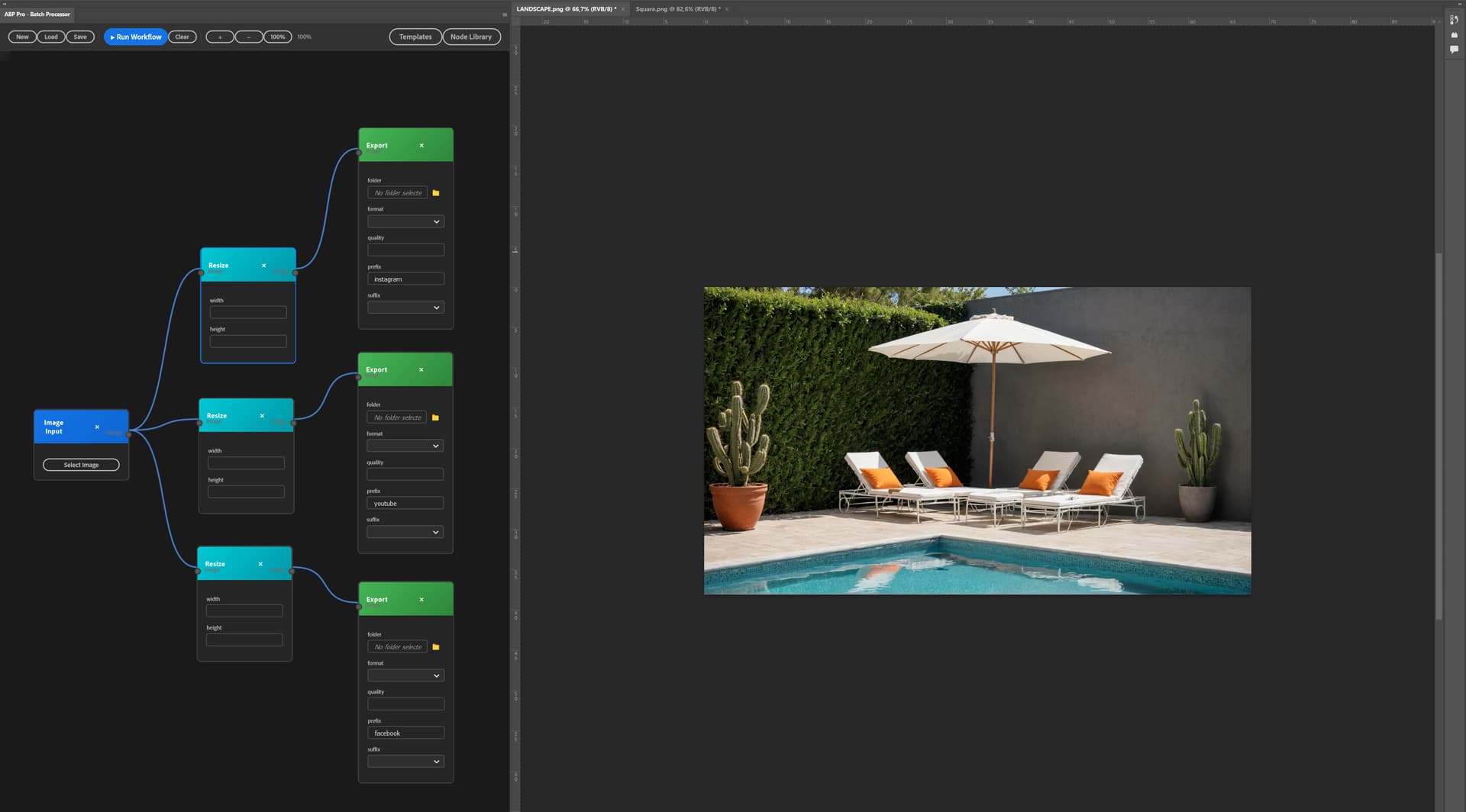
I have developed a Photoshop plugin that allows you to do batch processing via a nodal system! The possibilities are endless.
Would anyone be interested or have any suggestions for workflows?
Looks dope. What can you export with it?
Can I try it?
Thanks for your interest!
ABP Pro (Advanced Batch Processor) is a visual node-based workflow automation plugin for Photoshop that lets you create complex batch processing pipelines without writing code.
What you can export:
Key features:
Perfect for:
Current status: Beta testing phase! I’m looking for power users to test it and provide feedback.
The plugin is fully functional but I want to polish it based on real-world usage before the official release.
I’m especially interested in hearing about your specific workflow needs!
The goal is to make Photoshop automation accessible to everyone, not just scripters. Think of it as “Nodes for Photoshop” 
 Coming soon: I’m currently integrating AI-powered features including Flux Kontext, Nano Banana, and the ability to use local diffusion models directly in your workflows!
Imagine combining traditional image processing with AI generation, all within the same visual pipeline. Stay tuned!
It is very nice project. But I have some doubts.
I am not saying you are doing it wrong… but I think those are questions you can encounter and will help you to “sell” this plugin if you provide good answers.
Also I think this project is similar but different a bit: https://aescripts.com/automation-blocks-for-premiere-pro/ it might be worth looking at.
Thank you for your interest and excellent questions! These are exactly the points that help define ABP Pro’s unique position.
vs Photoshop Actions:
While Actions are great for linear recordings, ABP Pro offers:
Visual node-based workflow - see and modify your entire process at a glance
Conditional branching - “if width > 3000px, do X, else do Y”
Dynamic routing based on image properties (aspect ratio, size, content detection)
Parallel processing - one input can feed multiple export branches simultaneously
Live parameter editing without re-recording
Batch processing with per-file decision making
Conditions & Loops:
Yes! The Switch node already enables conditional routing, and we’re expanding the logic nodes (loops, if/then,
filters). For example, you can route portrait vs landscape images to different processing branches automatically.
Custom Nodes:
Absolutely - this is a core philosophy. The architecture is designed for community contributions. Users will be able to create and share custom nodes and complete workflow templates. Think “Photoshop automation marketplace.”
vs ComfyUI:
Great question! They serve different audiences and workflows:
ComfyUI = Technical users, AI-first, external to Adobe ecosystem
ABP Pro = Photoshop natives, integrated with Adobe tools, accessible to non-technical creatives
Our advantage is native Photoshop integration:
Direct access to layers, groups, smart objects, adjustment layers
Use all Photoshop filters, effects, and tools
No import/export friction - work with PSDs directly
Combine AI features WITH Photoshop’s professional editing tools
Real-world example: A photographer with 900 photos can:
Auto-route by filename patterns to folders
Detect faces → apply beauty retouching → export square crops
Detect objects → apply specific color grading
Generate multiple format exports based on dimensions
All while maintaining Photoshop’s non-destructive editing
The Sweet Spot:
ABP Pro bridges the gap between Photoshop’s power and modern automation needs. It’s for users who want more than Actions but don’t want to leave the Adobe ecosystem for ComfyUI’s complexity.
Would love to hear your specific use cases - this helps shape our roadmap.
Is it for sale?
Can I try it?
You can post a link to try it or test it.
Great answers! Thanks!
I think I could even imagine node for your software to call ComfyUI do something and then resume in Photoshop and vica versa. Do something in ComfyUI, call Photoshop, perform tasks, and return result to ComfyUI.
I think this is great and will be a good option for power users. I do think you might struggle to get mass adoption due to many people being intimidated by node based workflows.
Someone made a similar node based plugin for After Effects and I don’t think it ever really took off despite the initial hype.
I would focus on making a lot of beginner level tutorials to help get people past the fear of learning a whole new workflow.
Yes, it will be available for purchase, but there will be a beta test version available soon.
Thanks,
Yes, why not!
In a future version, integrating a link with Comfy is a good idea!
Yes, I agree, there is real resistance to nodal systems among the general public.
But since my plugin is primarily designed for advanced batch processing, I think it’s aimed more at professionals than the general public.
Nevertheless, I think it can help. I’m working on an AI that will allow users to make requests in natural language (prompt), and the AI will handle the workflow.
The same goes for custom nodes!
This may open more doors to the general public ?
When the test version is available I’ll be happy to try it.
Id be interested to try it too
If it works, it could. Because they would not need to understand or see nodes at all.
But then you can also question “why develop node editor when multimodal image editing models can already handle complex instructions abstracted into single step” e.g. qwen image edit or flux kontext.
And I think the answer depends on what performance/speed you need and HW you can use. And also how much deterministic the output should be.