Hi,
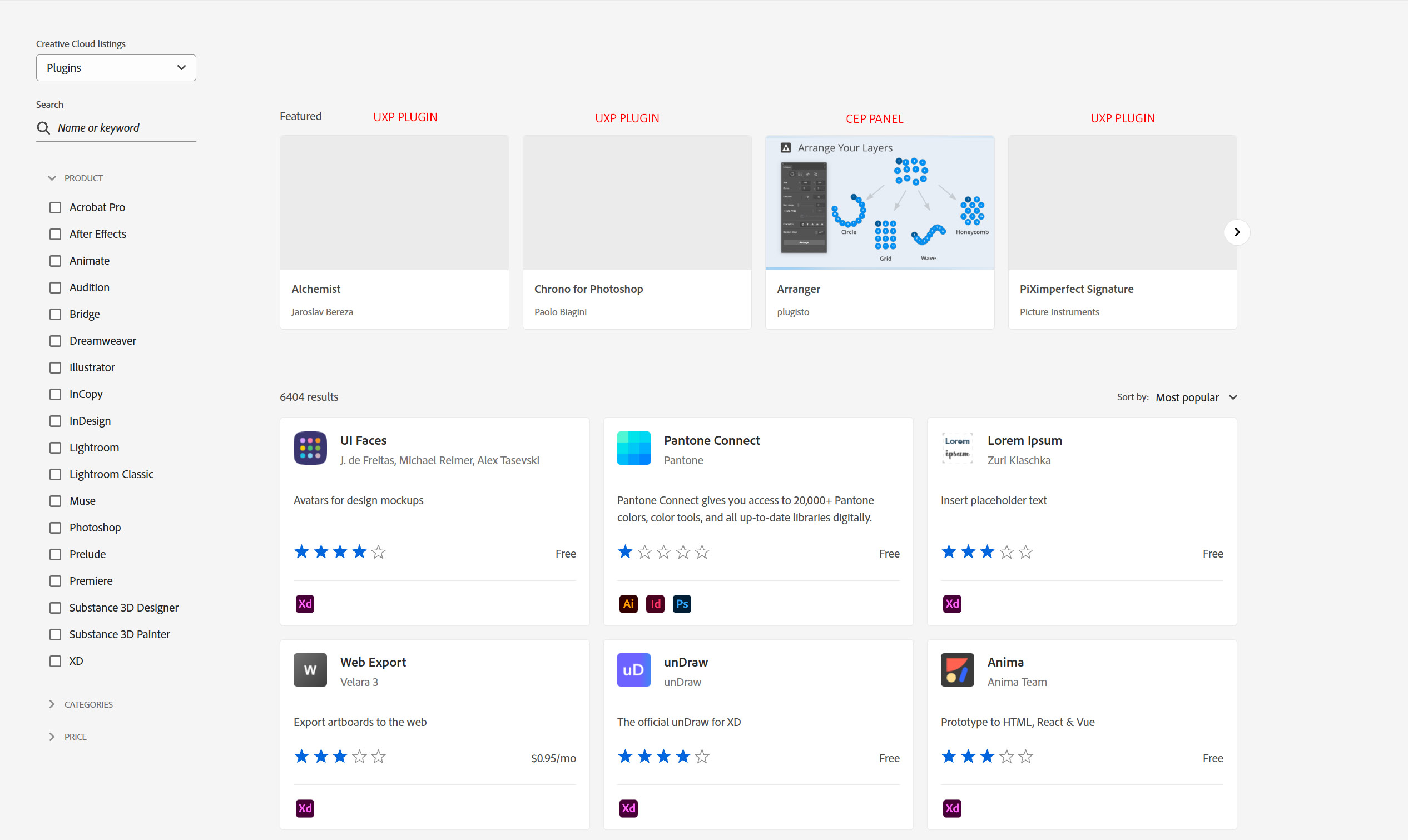
After the recent update of the Adobe Exchange website, the Featured line was reshuffled: older CEP plugins were removed from this block, and new UXP plugins (plus some CEP panels) were added.
The issue is that new UXP plugins in the Featured line are now displayed without any images: they show up as blank grey tiles, as if the previews failed to load. At the moment, it isn’t possible to add a featured image from the Developer Console, because there is no option/field for it.
In the previous version of the Developer Console, there was a separate “Featured Image” field where we could upload an image specifically for this section. In the new version, this field is gone — both for CEP panels and for UXP plugins. As a result, any new items that appear in the Featured line are shown without visuals.
For users, this looks like a technical problem with the site: they open Adobe Exchange, see several empty tiles and may assume that something is broken or that these plugins are incomplete or unavailable, and simply scroll past them.
This update went live more than a month ago, but the situation has not changed yet.
Could you please clarify: is it planned to add or restore a “Featured Image” field in the new Developer Console (for both CEP and UXP), so that items in the Featured line display correctly with images?